![GK3 Logo 500x200 Full Color.png]](https://knowledgebase.gk3capital.com/hs-fs/hubfs/branding/logos/GK3%20Logo%20500x200%20Full%20Color.png?height=40&name=GK3%20Logo%20500x200%20Full%20Color.png)
Access HeyGen
Login info: CLICK HERE
Step by step how to create a new video
- Login in and click create top left
- Then create a video ----> create in AI studio
- Script
For the script, all you do is paste it in the left-hand window,- you will see if you add additional frames at the bottom, the script section on the left then shows it broken down by section
- Template selection
From here you will see a small narrow section on the right hand side of the page, go to the 2nd from the bottom one titled "templates" and choose a template you want to use - Voice and Avatar selection
The next thing you need to select is the avatar and the voice. Most of the avatars lips do line up with the words, so I recommend the following avatars and voice combos . Ifn you find a better combo please notify Ryan Woelk- avatar abigail (plain blue shirt) - voice: “abigal - lifelike”
- avatar tahlia - voice:
- Hope
- Tahlia
- avatar georgia (plain grey shirt) - voice "georgia - lifelike"
- Background music
If you would to have music playing as well, I recommend- Title: “Epic new world”
- Volume Setting: 3%
- Putting on HubSpot
I find uploading the video to hubspot works better then the embed code
Example Video: CLICK HERE
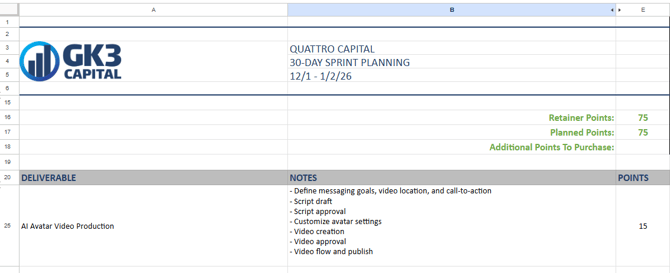
Sprint line item description and example
Point total: 15 points
Title: AI Avatar Video Production
Description
- Define messaging goals, video location, and call-to-action
- Script draft
- Script approval
- Customize avatar settings
- Video creation
- video approval
- Video flow and publish
Example:
Time expenditure expectations for AM team
- Script creation - depends on script size
- Landing Page - 30 mins
- 80% - 60+ mins
- Review output - 15 mins
- Adjustments - 5 mins
- Place on webpage - 5 mins
Estimated total: 55 mins to 2 hours
Quality Control Checklist
checklist:
- Avatar speaks naturally and conversationally
- Avatar’s facial expressions match tone
- All words pronounced properly
- No long pauses or rushed pacing
- Branding matches page or campaign
- CTA is clear
- Captions are accurate (if used)
- Timing and transitions between frames are smooth